
Portsmouth Disabled Parking: A Guide for Blue Badge Holders
Disabled Parking in Portsmouth: A Guide for Blue Badge Holders
Finding suitable parking can make a big difference when travelling around Portsmouth. The city has a mix of on-street spaces, council and privately operated car parks, and parking near popular destinations. If you hold a Blue Badge, knowing how local restrictions work can help you plan your journey and park with confidence.
Using your Blue Badge in Portsmouth
Blue Badge parking concessions apply across Portsmouth, but the rules depend on the type of space and the signs displayed nearby. Always check the restrictions before leaving your vehicle, as local limits and conditions can vary.
- Dedicated disabled bays: These are reserved for vehicles displaying a valid Blue Badge. Check for any time limit or other conditions shown on the sign or road marking.
- Pay-and-display and other on-street parking: Blue Badge concessions may allow you to park without payment in some on-street spaces, but local restrictions can apply. Follow the signs and check Portsmouth City Council’s current guidance before your visit.
- Yellow lines: In England, a Blue Badge may generally allow parking on single or double yellow lines for up to three hours, provided there is no loading restriction and the vehicle is not causing an obstruction or creating a safety risk. Display the badge and set the parking clock to show your arrival time.
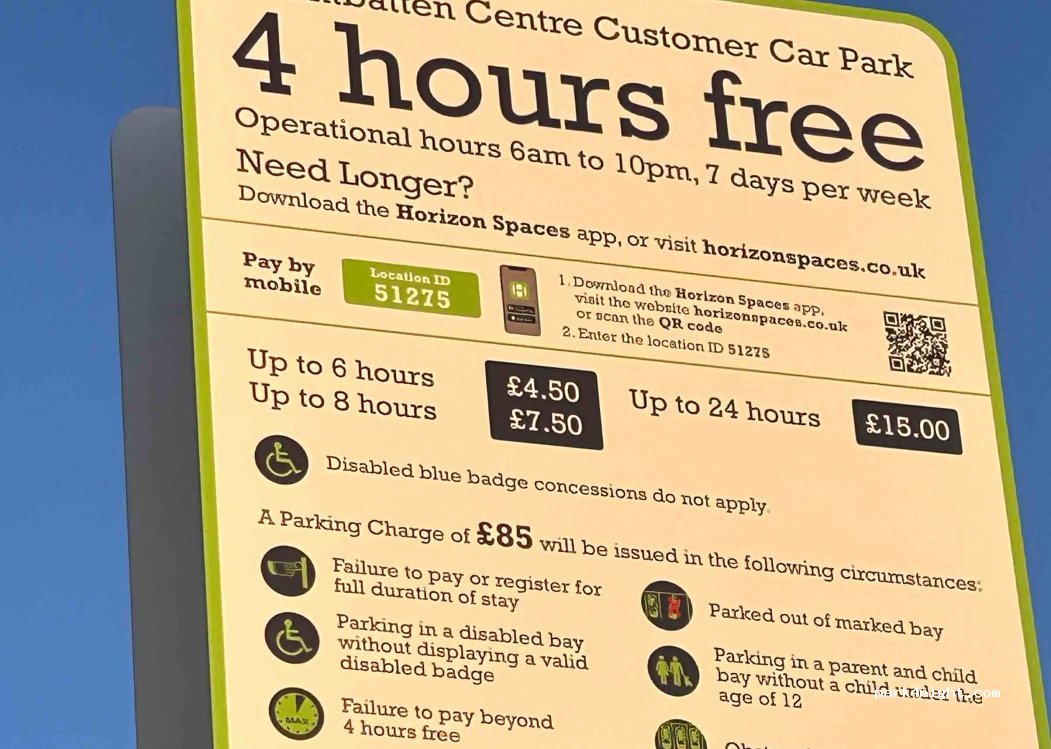
- Car parks: Accessible bays may be available in council-run and private car parks. Charges, time limits and badge concessions differ between operators, so check the car park’s information before you park.
Where to find accessible parking
Accessible parking is provided in a range of locations across Portsmouth, including town-centre areas, shopping destinations and car parks serving local attractions. The number of spaces and the arrangements for using them can change, so it is worth checking the relevant council or car park operator’s website before setting off.
If you are visiting a particular venue, check its accessibility information as well. It may list the nearest accessible bays, step-free routes and any drop-off points. This can be especially helpful when planning a trip to a busy event or destination.
How to display your Blue Badge
Display your badge clearly on the dashboard, with the front showing through the windscreen. The details, including the expiry date, should be readable from outside the vehicle. Where a parking clock is required, set it to your time of arrival and display it as instructed.
The badge is for the use of the holder, whether they are driving or travelling as a passenger. It should not be used to park when the badge holder is not making the journey.
Check restrictions before leaving your vehicle
A Blue Badge does not permit parking everywhere. You must not park where doing so would cause danger or obstruction, and the badge does not override every restriction. For example, loading restrictions may prevent parking on yellow lines, while bus stops, pedestrian crossings and clearways have their own rules.
Road signs and markings are important: they show which spaces are reserved, when restrictions apply and whether a time limit is in place. If the signs are unclear, choose another space and check the latest advice from Portsmouth City Council or the car park operator.
Plan your journey
Before travelling, check that your Blue Badge is valid and look up parking options close to your destination. Confirm opening times, charges, height limits and any access arrangements, particularly if you are visiting during a busy period. Allow extra time to find a suitable space and to reach your destination from the car park.
Clear, well-maintained parking bay markings help drivers identify accessible spaces and understand where they can park. By checking the signs, displaying your badge correctly and planning ahead, you can make parking in Portsmouth simpler and safer.
Parking rules and facilities can change. Always follow the signs on site and consult Portsmouth City Council or the relevant car park operator for the latest information.
Essential Information on Disabled Parking in Portsmouth: Top 7 FAQs Answered
- Where can I find disabled parking bays in Portsmouth?
- Can Blue Badge holders park for free in Portsmouth?
- Can I park on single or double yellow lines in Portsmouth with a Blue Badge?
- How long can I park in a disabled bay in Portsmouth?
- Do I need to display my Blue Badge and parking clock in Portsmouth?
- Can I use my Blue Badge in Portsmouth council and private car parks?
- Where can I check the latest disabled parking rules and restrictions in Portsmouth?
Where can I find disabled parking bays in Portsmouth?
Disabled parking bays in Portsmouth can be found on streets and in many council-run and privately operated car parks, including near the city centre and local attractions. Their number and availability vary by location, so check Portsmouth City Council’s parking information or the car park operator’s website before travelling, and follow the signs at the bay for any time limits or conditions.
Can Blue Badge holders park for free in Portsmouth?
Blue Badge holders can park free in Portsmouth’s on-street pay-and-display bays, subject to any restrictions shown on local signs. This concession does not necessarily apply in council or privately operated car parks, where charges and time limits may differ, so check the car park’s terms before leaving your vehicle. Always display your valid Blue Badge correctly and follow the signs and road markings.
Can I park on single or double yellow lines in Portsmouth with a Blue Badge?
In Portsmouth, Blue Badge holders can generally park on single or double yellow lines for up to three hours, unless there is a loading restriction or parking would cause an obstruction or danger. Set the parking clock to your arrival time and display it alongside your Blue Badge, so both are clearly visible through the windscreen. Always check nearby signs and road markings, as local restrictions may apply.
How long can I park in a disabled bay in Portsmouth?
There is no single time limit for every disabled parking bay in Portsmouth, so check the sign or payment notice beside the space before leaving your vehicle. Any stated maximum stay or return restriction applies to Blue Badge holders too; display your valid badge correctly and use a parking clock if the sign requires one.
Do I need to display my Blue Badge and parking clock in Portsmouth?
Yes. When using a disabled parking space or another Blue Badge concession in Portsmouth, display your Blue Badge clearly on the dashboard, with the side showing the wheelchair symbol facing outwards. You must also display and set your parking clock to your arrival time when parking on yellow lines under the Blue Badge concession, and wherever a time limit or local sign requires it. Always check the signs, as conditions can vary.
Can I use my Blue Badge in Portsmouth council and private car parks?
Yes, you can use your Blue Badge in Portsmouth council and private car parks, but the rules may differ between locations. Look for designated disabled bays and check the signs or payment instructions for any charges, time limits or badge concessions, as private operators can set their own terms. Display your badge as required and, if in doubt, check with the car park operator before leaving your vehicle.
Where can I check the latest disabled parking rules and restrictions in Portsmouth?
For the latest disabled parking rules and restrictions in Portsmouth, check Portsmouth City Council’s website, which provides current information on on-street parking, council car parks and Blue Badge concessions. For privately operated car parks, check the individual operator’s website or contact them directly, as charges and conditions can differ. Always follow the signs and road markings at the parking location, as these show the restrictions that apply.